






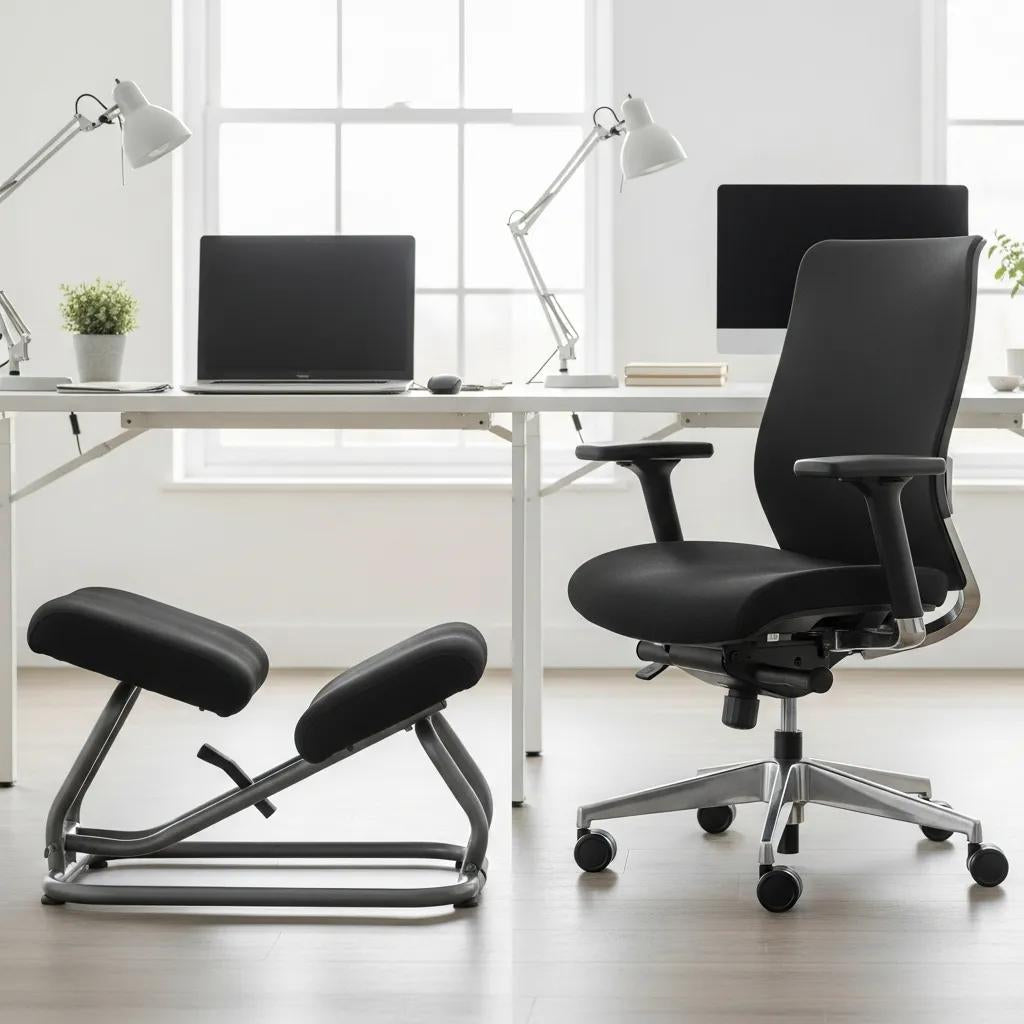
Kneeling Chair vs Traditional Office Chair — Which Supports Your Posture and Back?
Where you sit matters — not just for comfort today, but for your spine over the long term. This guide breaks down how kneeling chairs and traditional ergonomic office chairs work, the science behind posture and back discomfort, and practical setup and usage tips tailored for Australian workplaces. You’ll learn what forward-tilt kneeling designs do for the lumbar curve, how adjustable lumbar support helps in conventional chairs, and which work styles suit each option. We also cover common downsides, sensible transition plans for new users, and simple routines for alternating chairs during long days. Finally, we map Terra Wellness chair features to the functions discussed so you can match products to your needs without making any medical claims.
What Are the Key Benefits of Kneeling Chairs for Back Pain and Posture?

A kneeling chair tilts the seat forward and shares your weight between the sit bones and shins. That forward tilt encourages a more neutral spine by increasing hip flexion and a slight anterior pelvic tilt, which helps preserve the natural lumbar curve and can reduce strain on passive spinal tissues. Kneeling chairs also promote “active sitting” — low-level engagement of core muscles and more micro-movements — which helps circulation and counters the harms of long, static postures. They aren’t a one-size-fits-all solution: some people notice pressure on the knees, find the seat too small for long sessions, or need a short adjustment period. Below are the main benefits in an easy-to-scan list.
Typical benefits users report from kneeling chairs include:
- Improved spinal alignment: The forward seat angle encourages a healthier lumbar curve and reduces slouching.
- Active sitting and core engagement: The posture recruits abdominal and back stabilisers more than slumped sitting does.
- Lower disc compression: Weight redistribution can reduce compressive load on lumbar discs during seated tasks.
- Stronger posture awareness: The position gives clear feedback, making slouching easier to spot and correct.
These advantages come from the chair’s geometry, so knowing how each feature works helps you pick the right model. The table below links common kneeling chair features to likely posture and comfort outcomes.
Different kneeling chair features tend to produce predictable posture and comfort effects.
| Mechanism | How It Works | Typical Health Benefit |
|---|---|---|
| Forward-tilt seat (15–30°) | Rotates the pelvis forward and supports lumbar lordosis | Restores the lumbar curve and reduces slouch |
| Weight distribution to shins | Shifts some load away from the sit bones | Lowers compressive forces on the lower spine |
| Lowered seat height | Brings hip height closer to desk level | Simplifies monitor and keyboard setup |
| Rocking or flexible base | Allows subtle movement and micro-breaks | Boosts circulation and reduces stiffness |
Use this mapping to prioritise features when testing chairs or checking product specs. Knowing the mechanics makes setup tips and transition plans more effective.
Terra Wellness’s kneeling chair is designed around this forward-tilt geometry, showing how product features can support posture without making medical claims.
How Do Kneeling Chairs Improve Spinal Alignment and Core Engagement?
The forward tilt of a kneeling chair changes the hip–spine relationship so the pelvis tilts slightly forward and the lumbar curve is supported. That position asks the erector spinae and abdominal stabilisers to work at a low, sustained level — what we call active sitting — which helps shift load from passive tissues toward muscular support. A practical check is simple: look for a gentle ear-shoulder-hip vertical line and a soft abdominal brace. Understanding these mechanics explains why the chair feels different and how to keep the benefits over time.
What Are the Common Adjustment Periods and Potential Drawbacks of Kneeling Chairs?
Most people need a short adjustment period — from a few days up to a few weeks — as muscles adapt and knee contact increases. Early responses can include mild front-of-knee soreness, tight hamstrings, or postural muscle fatigue; these typically ease with a gradual ramp-up and regular movement breaks. Downsides include limited suitability for people with knee conditions, less convenience for reclining or very long sessions, and occasional mismatch with low desks. To reduce problems, alternate with a conventional chair, consider a padded knee cushion, and use timed blocks to increase tolerance steadily. These straightforward strategies make the transition safer and more comfortable.
What Advantages Do Traditional Ergonomic Office Chairs Offer for Comfort and Support?

Traditional ergonomic office chairs offer multiple adjustments — height, recline, lumbar support and armrests — so you can fit the chair to a wide range of body shapes and long workdays. Proper lumbar support fills the lower back’s natural curve at the right spot, helping reduce compensatory neck and upper-back strain during extended tasks. Recline and tilt let you change posture, moving load between the seat and backrest and reducing static pressure on spinal tissues. That versatility makes conventional ergonomic chairs the reliable choice for long sessions, meetings and roles that need a larger range of postures than kneeling chairs typically allow. Key advantages are listed below for quick reference.
- Personalised adjustability: Multiple settings let you match the chair to your body.
- Targeted lumbar support: Contoured or adjustable lumbar features help maintain a healthy lumbar curve.
- Comfort for long sessions: Bigger seats and recline options let you vary posture across the day.
These strengths make traditional chairs the default for many workplaces, but only if they’re set up correctly. The next section explains which adjustments matter most.
Terra Wellness’ ergonomic office chair focuses on adjustability and lumbar support to suit a broad range of workstations.
How Do Lumbar Support and Adjustability Enhance Sitting Posture?
Lumbar support preserves the lumbar lordosis so the spine’s load-bearing axis stays aligned, and adjustability helps position that support where your lumbar apex sits. Important adjustments include seat height (so your feet sit flat), seat depth (so thighs are supported without pressure behind the knees) and armrest height (so shoulders stay relaxed). Proper setup shares load between muscles and passive structures, reducing fatigue and discouraging forward head posture. Quick checks — a roughly 90–100° knee angle, feet flat, and a small gap between seat edge and calves — confirm a better fit. These habits make lumbar features genuinely effective.
What Are the Risks of Poor Design in Traditional Office Chairs?
A poorly designed chair can worsen back pain if it lacks adjustable lumbar support, forces shoulder elevation with fixed armrests, or has a seat depth that presses into the back of the knees. Signs that a chair may be a problem include ongoing lower-back tightness, growing neck tension during the day, leg numbness from pressure behind the knee, or a tendency to slouch despite trying to sit upright. Fixes include choosing chairs with adjustable lumbar height/depth, adding a separate lumbar pad when needed, and ensuring armrests allow relaxed shoulders with elbows level to the desk. Spotting these red flags early helps prevent chronic strain.
How Do Kneeling Chairs and Traditional Office Chairs Compare: Which Suits Your Work Style?
Comparing the two designs helps match chair choice to how you work: kneeling chairs suit short-to-moderate focused tasks where forward tilt and active sitting are helpful, while traditional ergonomic chairs are better for extended work, multitasking and collaborative roles. Consider posture support (kneeling: anterior pelvic tilt; traditional: lumbar contour), long-hour comfort (traditional often better), adjustability (traditional wins) and portability (kneeling chairs are usually lighter). The table below shows core features side-by-side, and a short checklist recommends typical fits by work style.
Use this table to compare core features quickly.
| Feature | Kneeling Chair | Traditional Ergonomic Chair |
|---|---|---|
| Seat angle | Forward tilt (15–30°) | Neutral to slight backward tilt |
| Primary support | Pelvis and shins | Lumbar pad and backrest |
| Best for | Short focused tasks, active sitting | Long sessions, varied tasks |
| Adjustability | Limited | High (height, depth, lumbar, armrests) |
This comparison highlights each design’s strengths and where trade-offs occur, making it easier to match your chair to the job. For hands-on evaluation, Terra Wellness product pages describe kneeling and office chairs so you can compare features against your setup.
Practical recommendations by work style:
- Choose a kneeling chair for 20–90 minute focused sessions when posture correction and core engagement are the priority.
- Choose a traditional ergonomic chair for longer desk work (over two hours) when reclining, and lumbar support reduces fatigue.
- Use a hybrid approach: alternate between chair types based on task and how your body feels to balance active and supported sitting.
These tips lead naturally into how personal factors and health conditions should shape your choice.
What Are the Differences in Posture Support and Health Benefits?
Kneeling chairs promote a forward-tilt posture that increases anterior pelvic rotation and encourages core activation, often reducing slumping and potentially lowering lumbar disc pressure in short sessions. Traditional ergonomic chairs emphasise lumbar contouring and multi-point adjustability to support the lumbar curve across a wider range of bodies and longer work periods, which helps prevent accumulated fatigue. In short, kneeling chairs give immediate posture cues and short-term engagement, while traditional chairs better support extended comfort and reduce fatigue-related compensations. Your typical work pattern should guide which outcome matters most.
How Do Personal Preferences and Existing Conditions Influence Chair Choice?
Your knees, hips, core strength and daily sitting time should inform the decision. Kneeling chairs are less suitable for people with knee problems or limited hip extension, while traditional chairs accommodate mobility limits and long hours more easily. If you have red-flag conditions — persistent knee pain, sciatica that worsens in certain positions, or severe osteoarthritis — consult a health professional before changing seating. As a rule: prioritise adjustability if you sit most of the day; prioritise active sitting if you want posture retraining in short, focused blocks. These simple rules help you choose pragmatically and safely.
How Can You Maximise Comfort and Health When Using a Kneeling Chair?
Comfort on a kneeling chair comes from proper setup, alternating with a conventional chair, and regular posture checks. Match seat height to your desk, consider a padded knee cushion if needed, and keep a gentle tension in the hip flexors. Short movement breaks and micro-stretches interrupt static loading and help tissues adapt; a progressive ramp-up builds postural endurance. Below is a step-by-step routine for newcomers and a compact schedule with recommended durations.
Follow this routine to introduce a kneeling chair safely:
- Set up: Adjust the seat so your hips sit slightly higher than your knees and your desk height feels comfortable.
- Start short: Begin with 15–30 minute blocks to let muscles adapt.
- Take breaks: Stand or walk for 2–5 minutes every 30–60 minutes.
- Alternate chairs: Return to a conventional chair after 60–90 minutes or when you notice fatigue.
Use the schedule below to increase time gradually and watch for symptoms.
| Use phase | Recommended duration | Notes |
|---|---|---|
| Beginner | 15–30 minutes per block, 2–3 blocks/day | Focus on posture cues and steady breathing |
| Ramp-up | Add 10–15 minutes per day as tolerated | Notice knee comfort and core fatigue |
| Maintenance | 45–90 minutes per session, alternating | Combine with a supportive ergonomic chair |
| Adjustments | Use a knee cushion or footrest as needed | Reduce the duration if pain persists |
This structured approach lowers risk and increases the likelihood of benefit. Regular checks and sensible alternation keep you progressing without overloading tissues.
What Are the Best Practices for Proper Sitting Technique and Alternating Chairs?
Begin with pelvic position: aim for a slight forward tilt, an open chest and relaxed shoulders, and keep a gentle abdominal brace to support the lower back. Set your monitor and desk so your neck stays neutral and your forearms rest comfortably to avoid shoulder strain. Work in 20–30 minute focused blocks, then take 2–5 minute movement breaks, and alternate between the kneeling and a fully adjustable chair to prevent local fatigue. Use a timer or reminders and do quick mobility moves — hip flexor stretches, calf raises, gentle spinal twists — during breaks to rebalance tissues. These habits help you keep the benefits of active sitting while reducing overuse risk.
How Long Should You Use a Kneeling Chair Daily for Optimal Benefits?
Follow a progressive schedule: start with 15–30 minute sessions and add 10–15 minutes per day as long as discomfort is mild and settling. Aim for 45–90 minute sessions once you’re adapted, always alternating with conventional seating across a full workday. Reduce or stop if you experience persistent knee pain, increased back stiffness beyond normal adaptation soreness, or numbness in the legs — and seek professional advice if those signs continue. Alternating kneeling blocks with a supportive ergonomic chair over an eight-hour day often gives the best balance of activity and rest.
Why Choose Terra Wellness Ergonomic Chairs for Your Australian Workspace?
Terra Wellness takes a holistic approach to workplace comfort, offering kneeling and office chairs designed to support posture, feel comfortable, and use natural-feel materials. Our seating options map to the mechanisms described above: forward-tilt geometry in kneeling models, and adjustable lumbar and seat options in traditional models. For customers who want a broader wellness strategy, we also offer complementary categories like massage tools and sleep aids that fit into a workplace health plan. The bullets below show how our product attributes respond to common ergonomic needs without making medical claims.
Terra Wellness product highlights and how they address ergonomic needs:
- Natural materials and considered craftsmanship: Choices made for comfort and durability that enhance the tactile experience.
- Feature-to-function mapping: Kneeling models focus on forward-tilt geometry and thoughtful padding; office chairs include adjustable lumbar supports and seat adjustments for a personalised fit.
- Holistic offering: Seating presented alongside massage and sleep support items to form a broader wellbeing toolkit.
These features help you choose a chair whose mechanics match your posture goals while fitting into a wider wellness approach.
What Unique Features Do Terra Wellness Kneeling and Office Chairs Offer?
Our kneeling chairs prioritise forward-tilt seat geometry and well-padded knee supports to encourage anterior pelvic tilt while minimising pressure points. Our ergonomic office chairs focus on adjustable lumbar support, seat depth and armrest positioning so you can dial in personalised alignment. Material and finish choices reflect our natural-material focus, pairing tactile comfort with practical ergonomics. These attributes are designed to help you pick a model that fits your posture needs and typical workload.
How Does Terra Wellness Support Customer Satisfaction and Holistic Well-being?
We put customer experience first and offer an expanded wellness catalogue to support life beyond the desk; our customer-friendly policies are designed to make your experience smooth and satisfying. More than just policies, we emphasise product quality, natural-feel materials and cross-category wellness supports like massage tools and sleep aids that complement ergonomic seating. If you’re matching a chair to a posture goal, review product descriptions and feature lists to confirm that a model’s mechanisms (forward tilt, lumbar adjustability, padding) match your priorities. For next steps: try chairs where possible, follow the setup and ramp-up guidance above, and prioritise adjustability if you sit most of the day.